


Reviewed September 2026
HubSpot Credits are the usage unit behind a growing set of AI, automation, intent and data features. The monthly allowance included with your subscription can disappear quickly when a high-volume workflow or agent moves from testing into normal operation, so the useful question is not just what each action costs. It is how many actions you expect, what happens at the limit and which controls you have set before usage scales.
This guide explains the current allowances and rates, shows how to build a simple forecast and separates three things that are often confused: included credits, additional capacity and pay-as-you-go overages.
What are HubSpot Credits?
HubSpot describes Credits as its usage model for selected features across the customer platform. A listed feature can consume credits per action, such as a Data Agent response or an AI workflow action, or per recurrence, such as monitoring a company for an intent signal each month.
The rate applies when the feature is available in your account and the listed action occurs. Feature access still depends on your HubSpot subscription. HubSpot also warns that automated, bulk and high-volume activity can consume credits faster, and that some actions may carry separate service charges such as telephony or SMS usage.
For planning purposes, treat Credits as a shared monthly capacity pool and use HubSpot’s published rate sheet as the source of truth.
Which accounts and users can use HubSpot Credits?
All HubSpot accounts on the seat-based pricing model receive included Credits. That account-level inclusion does not mean every user can run credit-consuming features. Only users with paid seats, including Core, Sales, Service and Revenue Seats, and users with Partner Seats can use HubSpot Credits. Free users and View-only Seat users cannot.
This matters for governance as well as access. A team may have an account allowance, but the people who configure, test or operate the relevant feature still need an eligible seat and the required permissions.
How many HubSpot Credits are included?
Your included allowance is based on the highest eligible subscription tier in the account. Credits are not added together across multiple HubSpot subscriptions, and buying more seats does not increase the account’s monthly allowance.
| Subscription basis | Starter | Professional | Enterprise |
|---|---|---|---|
| Smart CRM, Marketing Hub, Sales Hub, Service Hub, Content Hub or Revenue Hub | 500 | 3,000 | 5,000 |
| Data Hub or Customer Platform | 500 | 5,000 | 10,000 |
For example, an account with Marketing Hub Professional and Sales Hub Enterprise receives the Enterprise allowance rather than adding the Professional and Enterprise amounts together. Credits reset each month on the account’s usage-period date. Unused Credits do not roll over.
What currently uses HubSpot Credits?
The table below reflects HubSpot’s published rate sheet reviewed in September 2026. Rates and beta status can change, so check the live catalogue before making a contractual or high-volume operating decision.
| Feature | Credit-consuming action | Credits |
|---|---|---|
| Data Agent | Generate one response to one prompt for one record | 10 |
| Customer Agent | Resolve one conversation in a text-based channel | 50 |
| Prospecting Agent | Recommend outreach for one lead | 100 |
| Content Agent (Beta) | Generate one piece of content | 1,000 |
| Custom agents (Beta) | Use one action unit | 1 |
| Customer Agent voice (Beta) | Hold one minute of voice conversation | 50 |
| Knowledge Base Agent (Beta) | Generate one new knowledge base article | 200 |
| Nurture Agent (Beta) | Personalise one email for one contact | 10 |
| Revenue Agent (Beta) | Start payment-collection outreach for one invoice | 500 |
| AI action in workflows | Execute one AI action in a workflow | 10 |
| Intent | Create a company from, or monitor a company for, an intent signal for one month | 10 |
| Intent custom signal (Beta) | Monitor one company for one custom signal for one month | 50 |
| Intent market segment (Beta) | Create one company record from market segments | 10 |
| Data Studio (Beta), under 500,000 rows | Use a dataset in a workflow, segment, CRM sync or export | 25 |
| Data Studio (Beta), 500,000 to 5 million rows | Use a dataset in a workflow, segment, CRM sync or export | 75 |
| Data Studio (Beta), over 5 million rows | Use a dataset in a workflow, segment, CRM sync or export | 200 |
| HubSpot work agents (Beta) | Use one action unit | 1 |
For custom agents and work agents, one credit is charged per action unit. The number of action units a prompt needs determines the total. HubSpot lets you test a custom agent and review estimated usage during setup. For Data Studio, using a dataset in a report does not consume Credits, while the listed workflow, segment, CRM sync and export uses do.
Do not assume a beta label means free usage. Content Agent, custom agents, voice Customer Agent, Knowledge Base Agent, Nurture Agent, Revenue Agent, custom intent signals, Data Studio and work agents are all listed as beta and have published rates at the time of review.
Source: HubSpot Product & Services Catalog and Credits Rate Sheet
How to forecast monthly HubSpot Credit usage
A workable forecast starts with activity volumes, not subscription tiers. For each feature, multiply the expected number of billable actions or recurrences by the current rate, then add the feature totals together. Compare the result with your shared monthly allowance and any purchased capacity.
Use a low, expected and high case if volumes are uncertain. Include retries, re-enrolment, seasonality and growth in the number of eligible records. Then compare the forecast with the portal’s actual usage log during a controlled pilot.
Example 1: Customer Agent on a Professional allowance
If Customer Agent resolves 60 text-based conversations in a month, the estimate is 60 × 50 = 3,000 Credits. That equals the standard Professional allowance. Any Data Agent prompts, Prospecting Agent recommendations, AI workflow actions or other usage in the same account would take the total above the included pool.
Example 2: mixed agent and workflow usage
Suppose a Professional account expects 200 Data Agent responses, 100 AI workflow actions and five Prospecting Agent recommendations in one month:
- Data Agent: 200 × 10 = 2,000 Credits.
- AI workflow actions: 100 × 10 = 1,000 Credits.
- Prospecting Agent: 5 × 100 = 500 Credits.
The combined estimate is 3,500 Credits. Against a standard Professional allowance of 3,000, the forecast shortfall is 500 Credits. At the rates reviewed for this article, 500 pay-as-you-go Credits would cost $5 for that month, while a 1,000-Credit monthly capacity pack costs $10 and increases recurring capacity for the commitment term. The cheaper-looking option is not the only decision: continuity, predictability and the risk of the volume growing again all matter.
Example 3: Data Studio source size changes the estimate
If a dataset is used 12 times in a month through workflows, segments, CRM syncs or exports, the forecast depends on the number of rows in the primary source:
- Under 500,000 rows: 12 × 25 = 300 Credits.
- 500,000 to 5 million rows: 12 × 75 = 900 Credits.
- Over 5 million rows: 12 × 200 = 2,400 Credits.
The activation count is identical, but the source-size tier changes the estimate materially. Check both the number of uses and the primary-source row count before scaling.
What happens when included Credits run out?
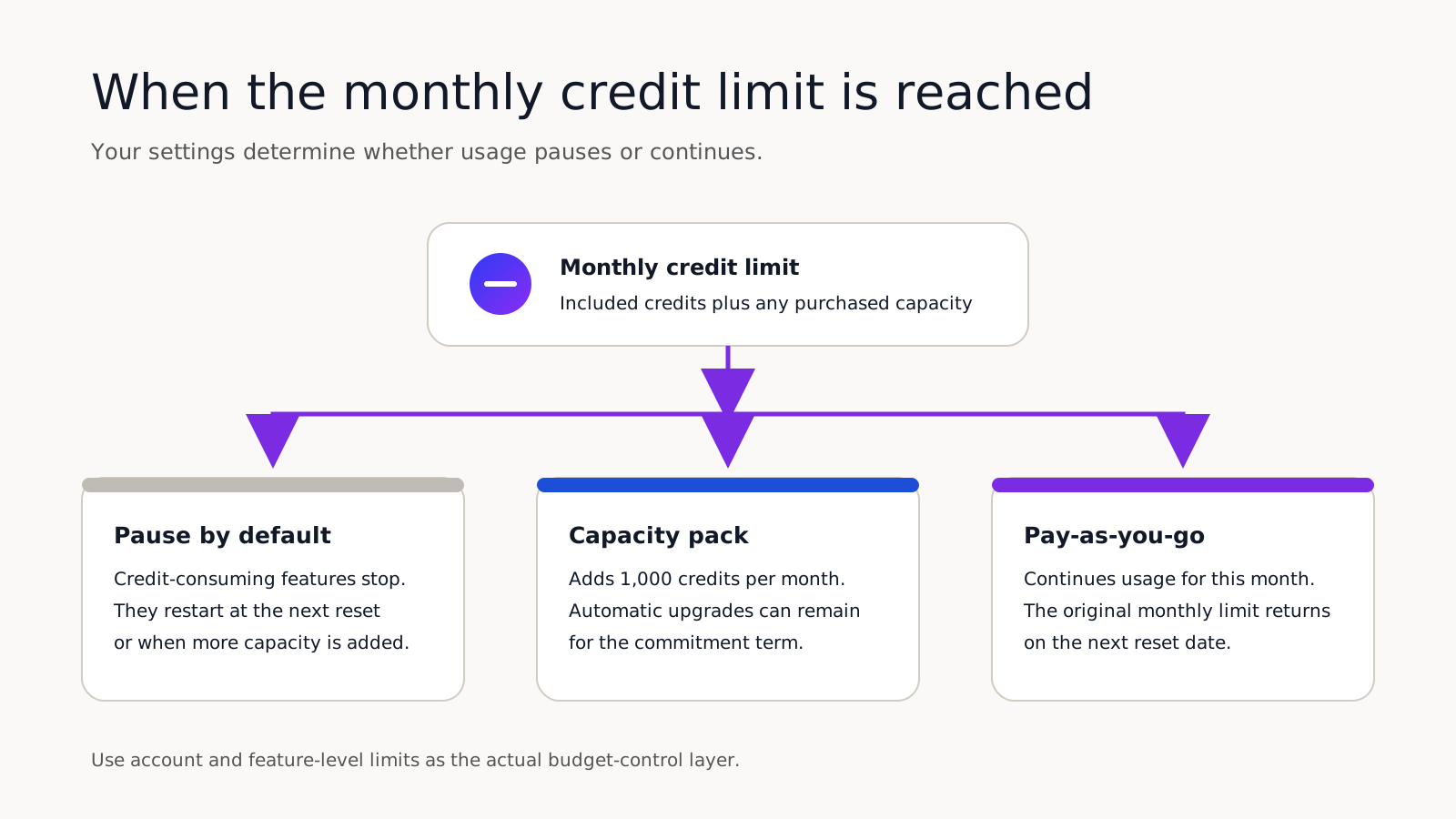
The outcome depends on whether the account has only its included Credits or has already bought additional capacity, and on the billing and limit settings selected by an administrator.
1. Pause until reset or capacity is added
If the account has only included Credits, credit-consuming features pause when the allowance is exhausted. They restart on the next monthly reset date or when additional capacity is purchased. A configured account-level maximum can also pause credit-consuming features when that maximum is reached.
2. Add a capacity pack
A capacity pack adds 1,000 Credits per month at $10 USD per pack. It increases the subscription’s monthly credit limit for the remainder of the commitment term. Once an account has purchased additional capacity, automatic upgrades are the default billing setting: if usage exceeds the monthly credit limit, HubSpot can add the higher capacity needed for the rest of the term. Additional capacity can only be cancelled or reduced at the end of the contractual commitment term.
3. Use pay-as-you-go overages
Pay-as-you-go charges $0.010 USD per Credit used above the monthly limit, invoiced in increments of 10 Credits. The account returns to its original monthly limit on the next reset date rather than remaining at the higher tier for the rest of the term.
This makes pay-as-you-go useful as a continuity option for a temporary or unpredictable peak. It is not the primary budget-control mechanism because it allows usage, and variable charges, to continue. HubSpot requires an account to buy additional Credits before pay-as-you-go can be enabled, and a Super Admin or Billing Admin must switch the setting on.
| Option | Current price | Practical effect |
|---|---|---|
| Capacity pack | $10 USD per 1,000 Credits per month | Adds recurring monthly capacity for the remainder of the commitment term. |
| Pay-as-you-go | $0.010 USD per Credit | Covers usage above the monthly limit for the current month; invoiced in increments of 10 Credits. |
Use limits as the actual control layer
HubSpot provides two distinct controls:
- An account-level maximum sets the overall monthly ceiling across credit-consuming tools. When the account reaches it, features requiring Credits pause until the next cycle or until the limit is increased.
- A feature-level limit blocks additional usage by a specific tool when that tool reaches its monthly limit. It is a spending limit, not a reserved allocation, so other tools can still consume the shared pool.
These controls are more important than choosing an overage billing method. Decide the acceptable monthly exposure first, set the account and feature limits, then choose whether a legitimate peak should pause, trigger more capacity or continue through pay-as-you-go. If Credits have already been used in the current period, some setting changes may not take effect until the next usage period, so check the effective date shown in the account.
A short HubSpot Credit governance checklist
- Nominate an owner. Give a Super Admin or Billing Admin responsibility for forecasting, settings, alerts and monthly review.
- Review the usage log. Check which action used Credits, how many each action used and how often it ran. Review historical usage as well as the current month.
- Set an account-level maximum. Choose the overall exposure the business is prepared to accept, not simply the highest amount available.
- Set feature-level limits. Prevent one agent, workflow family or data process from consuming the shared pool without a deliberate decision.
- Test before scaling. Run agents and automations on representative sample volumes, inspect estimated and actual usage, then increase volume in controlled stages.
- Reforecast after change. Recalculate when a new feature is enabled, a dataset crosses a row threshold, automation enrolment increases or HubSpot changes a rate.
The practical takeaway
HubSpot Credits are now used across Customer, Prospecting and Data Agents, AI workflow actions, intent functionality, Data Studio and a growing set of specialised and custom agents. The included allowance is useful, but it is shared, non-additive and reset monthly.
The safest operating pattern is straightforward: estimate usage from action volumes, validate the estimate in a pilot, review the usage log and set account and feature-level limits before scaling. Treat capacity packs as a recurring capacity decision and pay-as-you-go as a continuity decision for the current month, not as a substitute for governance.
If you would like support deciding where HubSpot AI and agents are ready to add value, or help to bring governance to an established portal, get in touch with Growth London.
Sources
Read On