


A practical 2026 guide to knowledge, actions, handoff and rollout
Customer Agent is no longer just a smarter chat widget. In a well-configured HubSpot portal, it can answer source-backed questions, assist support reps inside Help Desk, work across selected customer channels, hand conversations to the right people, use approved CRM information and perform tightly defined actions.
That does not mean every business should turn everything on at once.
The best Customer Agent setups start with a narrower question: which repeatable customer problem should this agent help with, and what should still stay with a person? Once that is clear, the rest of the implementation becomes much more practical.
This guide walks through the current set-up model and the decisions that make the biggest difference.
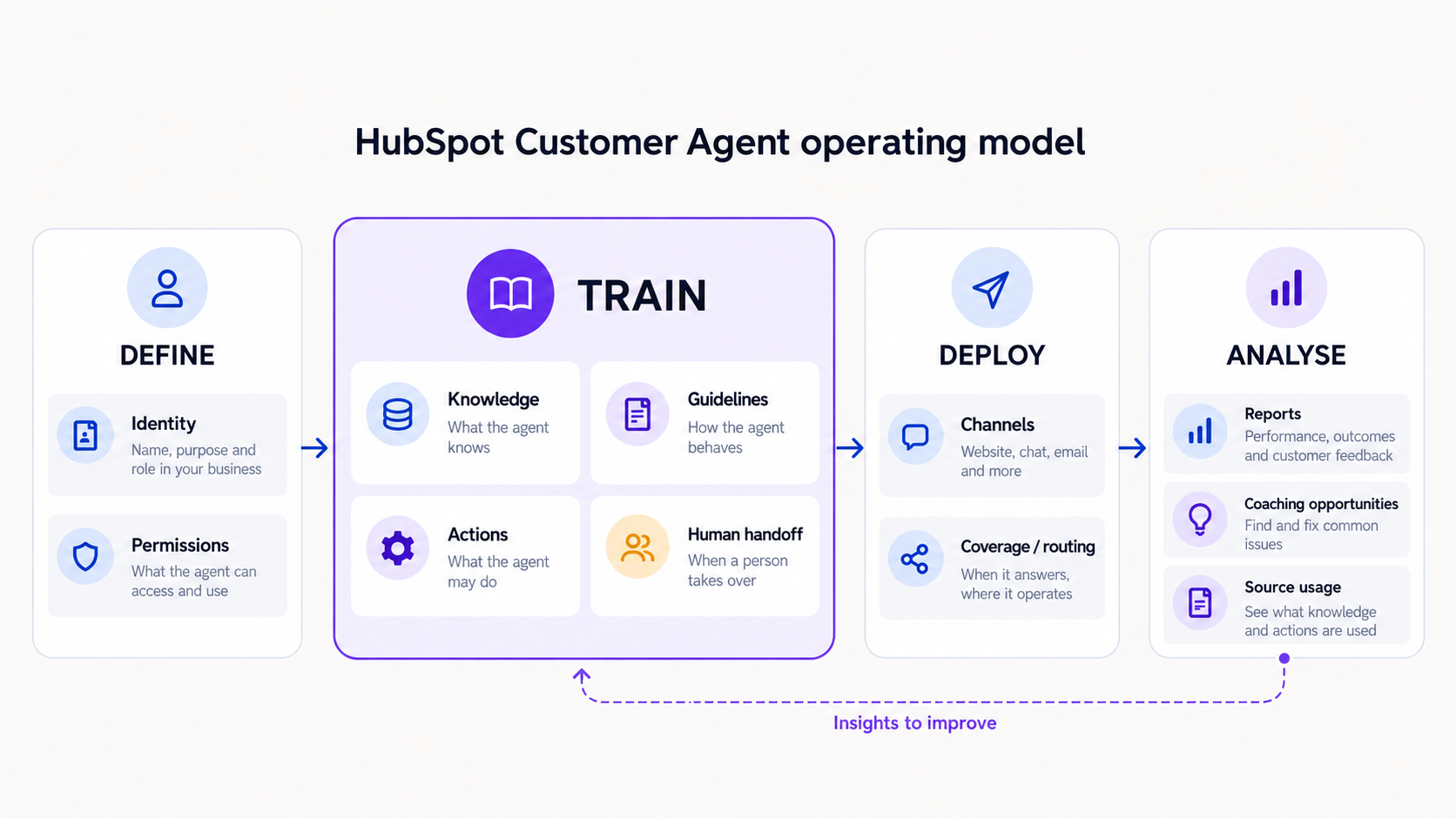
1. Decide what job the agent is doing
There are two sensible starting points.
The first is reply recommendations in Help Desk. The agent uses your approved knowledge to draft answers for a support rep to review, edit or send. It is a good first step where accuracy matters, the team wants to retain control of every reply, or you are still learning which questions customers ask most often.
The second is direct customer handling on one selected channel. The agent can answer routine questions and hand off the cases it should not own. This works well for a defined queue of repetitive enquiries: product usage, account basics, return or delivery policy, appointment information or simple qualification.
Do not begin by treating it as a general-purpose front door for every sales, service and technical question. Start with a real queue, a clear outcome and an agreed route to a human.
2. Check the operational foundations first
Before building the agent, confirm the practical requirements in the portal.
Customer Agent availability depends on the subscription and entitlement in the account. HubSpot currently lists it across Professional and Enterprise editions of several Hubs, and live deployment requires HubSpot Credits. Credits are consumed when the agent resolves a conversation, not simply for every message, so someone should own monitoring usage and capacity.
The person configuring the agent needs Customer Agent editor permission and an assigned seat. The account’s AI settings must also permit access to the relevant generative AI, CRM, customer-conversion and files data. For live channels, make sure the relevant inbox or Help Desk channel already exists. If the widget is on a non-HubSpot website, the HubSpot tracking code must be present.
These are not exciting tasks, but they are the difference between a clean setup and an agent that cannot be tested or deployed as intended.
3. Configure Knowledge as the factual source layer
Knowledge is the agent’s factual source layer. Configure it in Train > Knowledge.
Customer Agent can use HubSpot knowledge-base articles, website pages, landing pages, blogs, public URLs, uploaded files and targeted short answers. The recommended approach is a deliberately small and maintainable source set:
- Your current customer-facing knowledge-base articles or help pages.
- A handful of clearly written product, policy or service pages.
- Short answers for recurring, high-stakes or awkward questions.
- Only public-safe documents that have an obvious owner and review date.
For each source, ask three questions. Is it current? Is it safe for a customer to see reflected in an answer? Does it answer a question that really arrives through this channel?
Do not upload proposals, contracts, client data, internal operating notes or confidential spreadsheets. Private sources are not cited to the visitor, but their content can still inform a response. If an agent can read it, assume it could be reflected in its answer.
Structure still matters. Use clear headings, plain language, common customer phrases and concise answers. HubSpot can re-sync knowledge-base updates automatically; other synced content is refreshed weekly, and you can refresh it manually. Put this review into an owned process rather than assuming the agent will remain current by itself.
4. Define how the agent should behave
HubSpot now provides a dedicated Guidelines section under Train. Configure how the agent should communicate and behave here, separately from the factual sources in Knowledge.
Give it a recognisable name, an appropriate avatar and a personality that fits the channel. If the portal has a configured brand voice, use it only after checking that it is genuinely usable in a support conversation. Friendly and clear beats over-branded.
Then configure Guidelines in five practical parts:
- Tone: how the agent should sound.
- Response style: answer length, use of steps, links and formatting.
- Scripted responses: reusable greetings, apologies or closing language where exact wording genuinely matters.
- Guardrails: topics to avoid and the appropriate response when they arise.
- Custom: any additional instruction that does not belong in the categories above.
Guardrails should be specific. “Do not discuss pricing” is less useful than “Do not quote a project price. Explain that scope affects cost and offer the approved route to speak with the team.” The same applies to legal, security, refund, account-access and technical-architecture queries.
Guidelines influence the agent. They are not a guarantee that every AI-generated answer will follow exact wording, so test them before publishing changes.
5. Add actions and CRM permissions only where they earn their place
This is one of the biggest changes since the original guide. Customer Agent can now be given tightly controlled CRM permissions and can perform actions, including API-based actions against external apps. Possible examples include checking an order status, sending a password-reset route or booking a meeting.
The important word is controlled.
Start with a read-only or low-risk action that removes a genuine repetitive task. Define the trigger phrases, the information the agent must collect, what it should say with the result and what happens if the action fails. For anything that changes sensitive account or credential information, use a secure verification flow or secure link rather than trying to complete the change inside the chat.
Apply the same principle to CRM data. Grant only the properties the agent genuinely needs, use the smallest sensible scope and test the result as recognised and unrecognised contacts. Lead-qualification actions and the Actions Library may be available as beta features, so treat them as pilots, not as the foundation of a first deployment.
6. Make human handoff a designed experience
A handoff is not a failure. It is a core part of the service design.
By default, Customer Agent can hand off when it cannot answer, when a visitor asks for a human or when the agent is paused. Add clear custom handoff triggers for situations where a human should take over: cancellations, refunds, complaints, security issues, account access, a commercially sensitive query or anything that needs contextual judgement.
Then decide what happens next. HubSpot supports immediate live handoff, asynchronous follow-up or no human handoff. You can route all issues to the same users or teams, or use ticket and conversation workflows to route them based on conditions. Write separate messages for team-available and team-unavailable situations, and make sure the operational promise in those messages is one the team can keep.
For a sales-led website agent, a meetings link may still be the right route for certain enquiries. It is one option, not the whole handoff design.
7. Test the behaviour, not just the happy path
Do not test by asking one easy question and declaring the agent ready.
HubSpot’s test area lets you preview chat or email behaviour, test as a specific CRM contact or segment, test actions and inspect why the agent responded as it did, which triggers fired and which sources it used.
Build a test set from real conversations. Include:
- The top ten routine questions.
- Ambiguous and badly phrased versions of those questions.
- Questions where the answer exists in more than one source.
- Requests that should hand off immediately.
- Requests designed to test a guardrail.
- Recognised versus unrecognised customer scenarios.
- Action failures and unavailable-team scenarios.
For each test, record the expected outcome before running it: answer with source, ask a follow-up question, perform an action or hand off. Fix the source, guideline, action or routing rule that caused the error. Do not try to solve every issue by adding more prompt text.
8. Roll out in a controlled way
Deploy first to one channel or a limited percentage of conversations. Set working hours deliberately and define what happens when the agent is unavailable or not selected to respond. For email, use include and exclude segments where appropriate.
This gives the team room to review the live conversations, check the quality of handoffs and identify knowledge gaps before expanding coverage. If you need more control than a channel-wide rollout, use workflow or rule-based chatbot routing to decide which conversations reach the agent.
Pause the agent while making major source or configuration changes. If credits run out, HubSpot stops assigning new conversations, so the fallback routing must work even when you are not actively watching the agent.
9. Treat optimisation as an operating routine
Customer Agent now has more useful operational reporting than the early version of the product. Review:
- Resolution rate and resolved conversations.
- Deflection rate, with care: a deflection is not necessarily a successful resolution.
- Human handoffs and handoff rate.
- Visitor feedback.
- Average resolution time and channel volume.
- Coaching opportunities and their cause: knowledge, handoff, experience or action.
- Source Usage, including top performers, underperformers and underused sources.
Resolution reporting has a 72-hour evaluation window for agent replies, so the current week will lag. Do not overreact to a single day of data.
Review weekly during the first month, then agree a durable cadence. Each review should lead to a small, traceable change: update a source, add a short answer, refine a handoff trigger, improve an action or remove something that is not helping.
Common mistakes to avoid
- Treating the agent as a generic AI assistant instead of giving it a defined service job.
- Uploading internal or confidential material because it is “only for training”.
- Giving it broad CRM access or complex actions before proving the low-risk use case.
- Assuming branding settings will solve weak or conflicting content.
- Handing off without an owner, availability rule or useful message to the customer.
- Switching on every channel at 100% coverage on day one.
- Measuring deflection as though it always means a customer’s problem was solved.
- Leaving sources unowned, unreviewed and out of date.
The practical checklist
Before launch, you should be able to answer yes to each of these:
- We have named the customer problem and channel the agent will handle.
- We know who owns the knowledge, actions, routing and performance review.
- Every source is current and safe to surface to a customer.
- Guidelines explain tone, response style, scripts and guardrails.
- CRM permissions and actions use least privilege.
- Handoff triggers, routing, hours and customer messages have been tested.
- The pilot has a limited channel or coverage percentage.
- We know which metrics we will review and when.
Customer Agent can remove a surprising amount of repetitive work. But the real value is not a more talkative chat widget. It is a more reliable service process: clear knowledge, sensible automation, human judgement where it matters and a routine for getting better over time.
If you would like help auditing your customer-support journey, preparing the right knowledge sources or configuring Customer Agent around your existing HubSpot processes, Growth London can help.
Read On