


Prospecting Agent is definitely one of the hot topics in HubSpot at the moment. It is easy to see why: prospecting is time-consuming, highly repetitive, and also an area where better research and personalisation can make a difference.
For many teams, though, the challenge is not whether to use AI, but where to start. There is often a big gap between testing a few AI features and feeling comfortable letting an agent take action on your behalf. So, how do you actually get started with it without overcomplicating things?
What is HubSpot Prospecting Agent?
HubSpot describes Prospecting Agent as an AI-powered sales tool built into HubSpot that can identify good-fit companies, find relevant contacts and generate personalised outreach using CRM data and current buying signals.
At a practical level, it can help to
-
Identify opportunities: monitor signals such as website activity and other buying triggers to surface companies that may be worth contacting.
-
Find the right people: identify or source relevant contacts within those accounts.
-
Research and personalise outreach: use CRM information, recent engagement and external research to draft outreach that is specific to the company and contact.
The agent can take recent CRM engagement into account, including form submissions, page views, calls, meetings, notes and email opens. Plays guide how the agent researches and approaches different segments and personas.
Prospecting best practices still matter
AI can make prospecting faster, but it does not remove the need for good prospecting fundamentals. In fact, the better your targeting, context and messaging rules are, the more useful the agent becomes.
-
Start with a clear ICP: Know which companies are genuinely worth pursuing, and prioritise the accounts where you can create the most value. Prospecting Agent needs a clear, defined audience to work with.
-
Understand the person: Understand the priorities, pressures and challenges associated with the person’s role. Good personalisation is never about just adding a first name and company name to your message.
-
Identify meaningful trigger events: A good prospecting message needs a reason for contacting someone now. Look for relevant changes or signals in the business, then think about why that event matters and how it connects to the value you can provide.
-
Have a reason for reaching out: Avoid generic “just checking in” messages. The outreach should make it clear why this company, why this person and why now.
-
Don’t treat it as a bulk email generator: Effective prospecting still depends on consistent activity, staying up to date with target accounts and building context over time. Prospecting Agent should support a thoughtful prospecting process, not only help you send more emails.
Start controlled, then expand
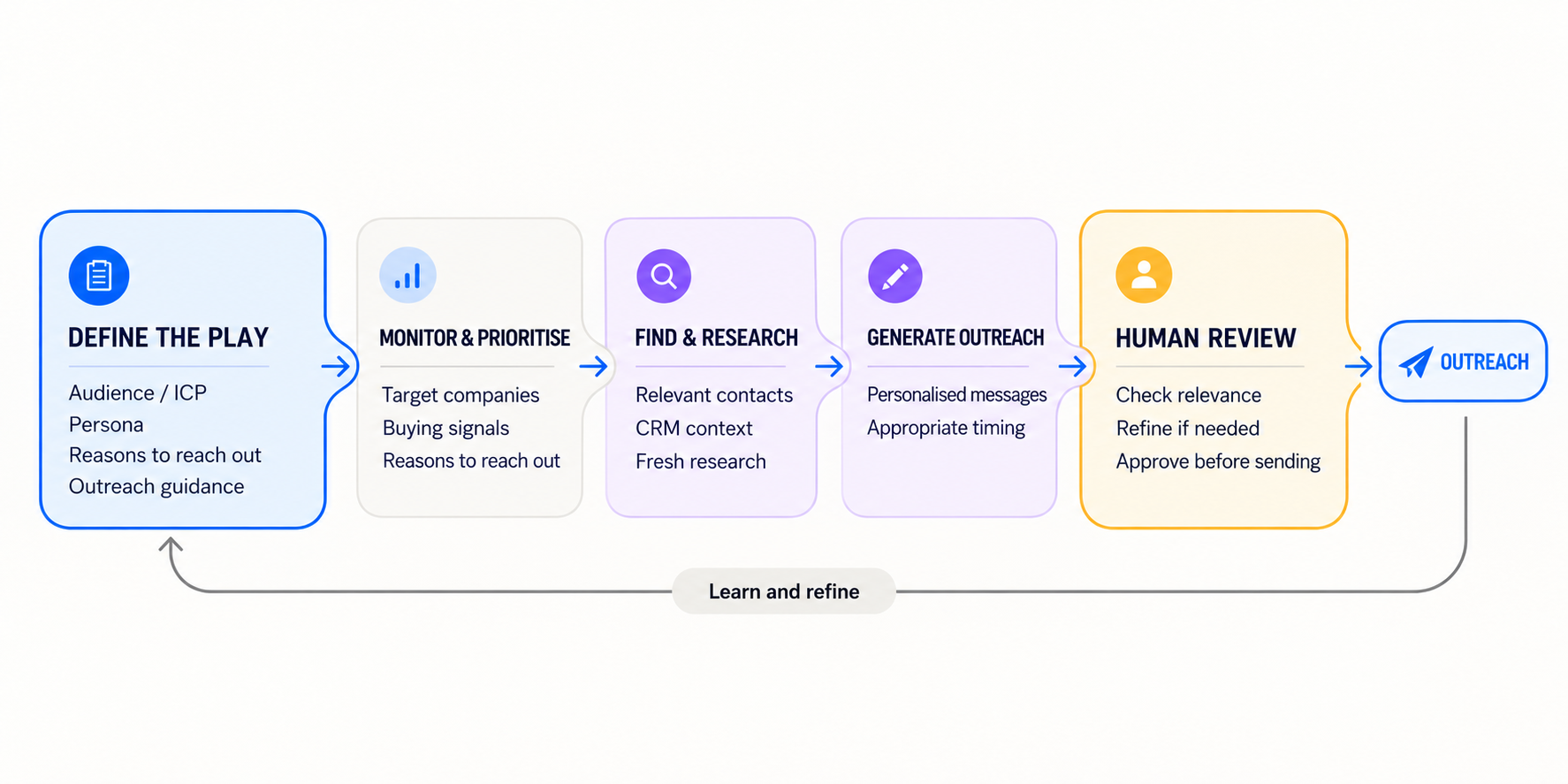
You do not need to jump straight into fully autonomous AI-led prospecting. An easier starting point is to use Prospecting Agent in a controlled way, with a clearly defined audience, messaging rules and human review.
Start by letting the agent do the heavy lifting around research, drafting and personalisation, but keep human approval in place. Review what it is finding, whether the messages are genuinely relevant and whether the tone feels right for your business.
Start controlled: use HubSpot Prospecting Agent like a smarter sequence, with clear targeting, human review and control over your outreach.
Once you are confident in the quality of the inputs and outputs, you can gradually give the agent more autonomy. The goal is not to automate everything as quickly as possible, but to build a process that is both more efficient and still feels relevant, considered and human.
With the best practices above in mind, a first use case of Prospecting Agent could be to keep the audience tightly controlled and use Prospecting Agent within a process you already understand.
1. Check your Agent Hub context
The first step is to make sure the context in Agent Hub is up to date. Check that your products and services are accurate, your customer profiles reflect the audiences you actually want to target, and your brand kit and messaging are current.
2. Create a play
Before creating the play, it helps to get the basics clear, because the quality of the outreach depends heavily on the context you give the Prospecting Agent.
Make sure you can answer:
-
Who are you targeting? Define the audience as specifically as possible.
-
What are you selling? Be clear about the product, service or offer the outreach is focused on.
-
What problems do you solve for this audience? Give the agent enough context to connect your offer to relevant pain points.
-
What makes the approach relevant or different? Highlight the value proposition or angle that should come through in the messaging.
-
What external context should the agent pay attention to? If this information is already provided by the targeted audience list make sure you highlight this in the setup.
-
What tone and style should the outreach use? Give the agent guidance on how formal, direct or conversational the messaging should feel.
-
What should the call to action be? Decide whether you want to ask for a meeting, offer a relevant resource, ask a simple question or use another lower-friction next step.
3. Choose a controlled audience
Prepare a list of contacts in HubSpot, so instead of asking the agent to find its own audience, choose manual enrollment and keep full control over who enters the play.
A controlled audience works especially well when there is already a clear reason for contacting the person.
For example:
-
Event attendees or people you met at an event: follow up with people who already have some context on your business, using the event or conversation as the starting point.
-
Previous opportunities that did not progress: re-engage contacts where there was genuine interest in the past, but the timing, budget or product fit was not right. This can work particularly well if something has changed, for example you now offer a feature or service they originally needed.
-
Existing high-fit contacts showing new intent: use a defined list of ICP contacts who have recently visited key pages, downloaded relevant content, engaged with a campaign or shown another meaningful signal that gives you a timely reason to reach out.
4. Define the outreach and timeline
When you configure the outreach, define the steps and timeline. Give the agent more detailed guidance on how you want the outreach to sound, including example email language and specific instructions within the automated email settings.
If we use the event list example above, the outreach already has a natural reason behind it: the contact attended the same event, met someone from your team, or engaged with something related to the event.
For example, your first outbound email instruction could be:
Write a short follow-up email to someone who attended [Event Name]. Reference the event naturally, but do not imply that we spoke personally unless this is confirmed in the CRM. Focus on [specific problem or topic] and explain briefly how we help with it. Keep the tone friendly, practical and conversational. Do not list multiple services. End with a low-pressure question asking whether this is something they are looking at at the moment.
5. Turn on email review
In the automate settings select review emails before sending rather than allowing the agent to send autonomously.
6. Test with a few contacts
Test the play first with example contacts. Review the research, messaging and suggested outreach, then adjust the play instructions until the output feels right.
Once you are happy with the setup, publish the play and enrol a couple of real contacts from the actual audience. Review the messaging again. Tweak the play again if needed before enrolling the full list.
7. Enroll the full list once you are happy
Once you are happy with the setup, enroll the contacts from your prepared list, review the suggested outreach and start sending.
Test, learn and expand
The approach outlined above gives you a low-risk way to start using Prospecting Agent while you test and learn. It can take care of much of the research, message composition, personalisation and adaptive outreach defined in the play, while you remain in control of the audience, the strategy and what actually gets sent.
In other words, you are using AI to make an existing prospecting process smarter and more efficient. Once you are comfortable with the setup and trust the quality of the output, you can gradually broaden the approach. That might mean expanding the audience, testing additional plays or personas, or reducing some of the manual review steps.
Need help putting HubSpot AI and agents to work?
Prospecting Agent is one example of how AI can be introduced into existing HubSpot processes without overcomplicating things. Growth London helps businesses identify practical use cases, prepare the CRM and data foundations, configure agents and automation, and build AI into day-to-day marketing, sales, service and operational workflows. Get in touch and let’s talk about how to introduce AI and Agents into your existing processes.
You might also be interested in
Read On